
07/10 18:07 2022
01/03 14:22 2026
最近新しいJavaScriptランタイムBunがが盛り上がっているみたいなので、Bunとその開発言語であるZigの開発環境構築をしてみました。 公式以上の内容はないので、Macで概要だけ掴みたい人もしくは、Neovim/coc.nvim構成でzigの開発環境を構築したい人向けです。
JavaScriptランタイムでは、denoが最近では有名であり、RustでV8 bindingで実装されています。一方Bunは、JavaScriptCoreをZigという言語で拡張しているみたいです。
$ curl -fsSL https://bun.sh/install | bash

######################################################################## 100.0%
Bun was installed successfully to ~/.bun/bin/bun

 Added "~/.bun/bin" to $PATH in "~/.zshrc"

To get started, run

   exec /bin/zsh
   bun --help
インストールすると、~/.zshrcに自動で追記されます。
[ -s "$HOME/.bun/_bun" ] && source "$HOME/.bun/_bun"
パスを通す
export PATH="$HOME/.bun/bin:$PATH"
内容的にasyncする意味はないですが、、トップレベルawaitできる確認する意味で、、
const main = async () => {
  console.log("hello world!");
};

await main();
$ bun main.ts
hello world!
ziglang.org 参照
brew install zig

# latest
brew install zig --HEAD
$ zig --help
Usage: zig [command] [options]

Commands:

  build            Build project from build.zig
  init-exe         Initialize a `zig build` application in the cwd
  init-lib         Initialize a `zig build` library in the cwd

  ast-check        Look for simple compile errors in any set of files
  build-exe        Create executable from source or object files
  build-lib        Create library from source or object files
  build-obj        Create object from source or object files
  fmt              Reformat Zig source into canonical form
  run              Create executable and run immediately
  test             Create and run a test build
  translate-c      Convert C code to Zig code

  ar               Use Zig as a drop-in archiver
  cc               Use Zig as a drop-in C compiler
  c++              Use Zig as a drop-in C++ compiler
  dlltool          Use Zig as a drop-in dlltool.exe
  lib              Use Zig as a drop-in lib.exe
  ranlib           Use Zig as a drop-in ranlib

  env              Print lib path, std path, cache directory, and version
  help             Print this help and exit
  libc             Display native libc paths file or validate one
  targets          List available compilation targets
  version          Print version number and exit
  zen              Print Zen of Zig and exit

General Options:

  -h, --help       Print command-specific usage
$ mkdir hello-world
$ cd hello-world
$ zig init-exe
info: Created build.zig
info: Created src/main.zig
info: Next, try `zig build --help` or `zig build run`
$ tree
.
├── build.zig
└── src
    └── main.zig
$ zig build run
info: All your codebase are belong to us.
cocプラグインを導入
:CocInstall coc-zig
LSPのzlsのREADMEをみつつ、導入
brew install xz
mkdir $HOME/zls && cd $HOME/zls && curl -L https://github.com/zigtools/zls/releases/download/0.9.0/x86_64-macos.tar.xz | tar -xJ --strip-components=1 -C .
実行権限を付与
$ chomd +x ~/zls/zls
パスを通す
export PATH="$HOME/zls:$PATH" # LSP
coc-settings.jsonにzlsのパスを追記
"zig.path": "~/zls/zls"
補完がバシバシ効きますし、コードジャンプも快適です。
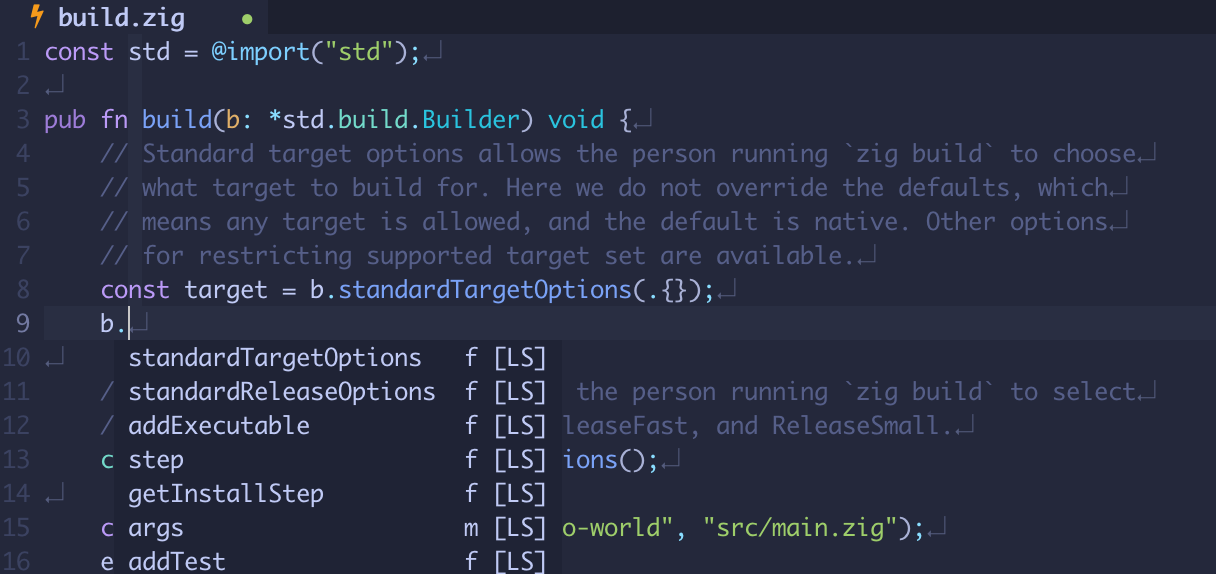
公式が出しているVimプラグインziglang/zig.vimを利用。init.luaの詳細は、shuntaka9576/dotfiles参照。
vim.api.nvim_command("autocmd BufNewFile,BufRead *.zig setlocal tabstop=4 shiftwidth=4 expandtab")
...
use({
  "ziglang/zig.vim",
  function()
    vim.cmd [[
      let g:zig_fmt_autosave = 1 -- オートフォーマット設定を有効化(便利なので特別な理由がない限り有効化推奨)
    ]]
  end,
})
あまり環境構築周りでハマることはなかったです、LSPやオートフォーマッターも揃っていていい感じです。WASM周りが気になるので、別記事で試していこうと思います。