
03/01 23:34 2021
01/03 14:22 2026
GitHubは、GitHubと連携した独自のアプリケーションを作成する手段として、GitHub AppsとOAuth Appsを提供しています。 連携する際のシーケンスをよく忘れるので、整理のため記事にすることにしました。
詳細は、GitHub公式 | differences-between-github-apps-and-oauth-appsを読むと良いと思います。
大きな違いになるのは、下記の点と考えます。
OAuth Appsは、GitHubユーザーアカウントの権限を委譲するため、GitHubでSSOする際に利用する例もあります。(後述)
一方で下記の点でGitHub Appsと比較し扱い辛い点があります。
GitHub Appsは、GitHubリポジトリに対した権限設定が可能。前述した問題点を解消しています。 以上より、OAuth AppsはGitHubのユーザーに対するサービスを提供する際に適している一方で、リポジトリに対する手段としては扱い辛い点があります。
フローは下記です。端折っている部分もあります。
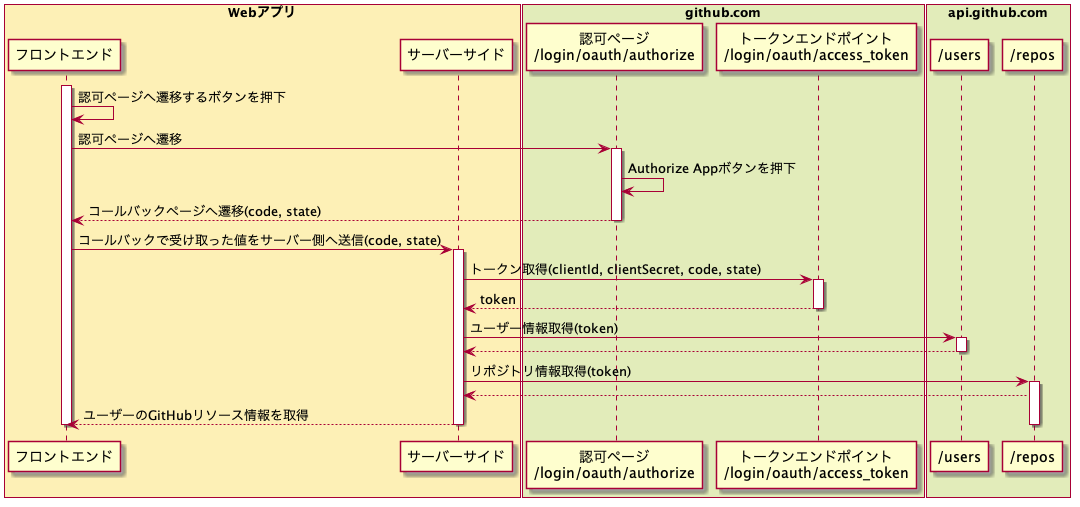
OAuthは、プロフィールAPIと組み合わせることで認証することが可能です。OAuth認証と呼ばれていたりします。 OAuthは認可の仕組みですが、GitHubが不足している部分を拡張しているため認証に利用することが可能です。
注: ここからは推測を含みます。間違っていたらすいません。。
qiitaやdev.toといったサイトは、GitHubアカウントでログインすることが可能です。
これはGitHubのOAuth Appsを利用しOAuth認証を使うことで実現しています。
おおよそ、以下のような処理を実装していると推測します。
次はGitHub Appsについてです
フローは下記です。端折っている部分もあります。

OAuth Appsと比較し、複雑です。上記の画像に振った番号の箇所について補足します。
登場する概念は下記の表の通りです。 例は空白は任意の文字列や数値で形式が決まっているものはイメージしやすいよう補足の意図で記載しています。
| 項 | 登場する概念 | 説明 | 例 |
|---|---|---|---|
| 1 | GitHub Apps ID | GitHub Appsに一意なID(開発者のコンソールではApp IDという表記です) | |
| 2 | GitHub Appsの秘密鍵 | GitHub Appsに登録した秘密鍵 | -----BEGIN RSA PRIVATE KEY-----...(省略) |
| 3 | installation_id | GitHub Appsをインストールした組織またはユーザーに割り当てられるID ※1 | |
| 4 | JWTトークン | GitHub Apspの情報を取得ためのトークン 1,2,3を利用して作成されたトークン |
eyJ..(省略) |
| 5 | アクセストークン | GitHub Appsをインストールしたユーザーリソースにアクセスするためのトークン 4と/app/installtions/${installtion_id}/access_tokenエンドポイントを用いて作成されたトークン |
JWTトークンは、下記の方法で生成します
const cert = config.privateKey; // 表の項2
const payload = {
  exp: Math.floor(Date.now() / 1000) + 60,
  iat: Math.floor(Date.now() / 1000) - 10,
  iss: config.appId, // 表の項1
};

const jwtToken = jwt.sign(payload, cert, { algorithm: 'RS256' });
※1 GET /app/installations/{installation_id}を利用すれば、intalltion_idがユーザーに属するか組織に属するか確認することができます
①で作ったJWTトークンを利用してアクセストークンを作成します
const response = await Axios.request({
  method: 'POST',
  url: `https://api.github.com/app/installations/${config.installationId}/access_tokens`,
  headers: {
    Authorization: `Bearer ${jwtToken}`, // 表の項4
    Accept: 'application/vnd.github.v3+json',
  },
});

const accessToken = response.data.token
octokitを利用すると下記のようになります。(※1)
import { Octokit } from '@octokit/rest';

const octokit = new Octokit();

const response = await octokit.request(
  'GET /repos/{owner}/{repo}/contents/{path}',
  {
    owner: params.owner,
    repo: params.repo,
    path: params.path,
    headers: {
      Authorization: `token ${accessToken}`, // 表の項5
      Accept: 'application/vnd.github.v3+json',
    },
  },
);
※1 @octokit/auth-appを利用すれば、JWTの作成やアクセストークン作成の処理を隠蔽してくれます ただwebpackとの相性の問題があり、前述した形でリクエストしています。issue。
最終的にこんな形でクラスを書いてあげると、便利だと思います。
/* eslint-disable @typescript-eslint/explicit-module-boundary-types */
import { Octokit } from '@octokit/rest';
import Axios from 'axios';
import * as jwt from 'jsonwebtoken';

type GitHubAuthAppConfig = {
  appId: number;
  privateKey: string;
  installationId: number;
  jwt: string;
  accessToken: string;
};

export class GitHubAuthApp {
  private config: GitHubAuthAppConfig;
  private octokit: Octokit;

  constructor(config: GitHubAuthAppConfig) {
    this.config = config;
    this.octokit = new Octokit();
  }

  static init = async (config: {
    appId: number;
    privateKey: string;
    installationId: number;
  }) => {
    const cert = config.privateKey;
    const payload = {
      exp: Math.floor(Date.now() / 1000) + 60,
      iat: Math.floor(Date.now() / 1000) - 10,
      iss: config.appId,
    };

    const jwtToken = jwt.sign(payload, cert, { algorithm: 'RS256' });

    const response = await Axios.request({
      method: 'POST',
      url: `https://api.github.com/app/installations/${config.installationId}/access_tokens`,
      headers: {
        Authorization: `Bearer ${jwtToken}`,
        Accept: 'application/vnd.github.v3+json',
      },
    });

    return new GitHubAuthApp({
      appId: config.appId,
      privateKey: config.privateKey,
      installationId: config.installationId,
      jwt: jwtToken,
      accessToken: response.data.token,
    });
  };

  getInstallId = async () => {
    const response = await this.octokit.request(
      'GET /app/installations/{installation_id}',
      {
        installation_id: this.config.installationId,
        headers: {
          Authorization: `Bearer ${this.config.jwt}`,
          Accept: 'application/vnd.github.v3+json',
        },
      },
    );

    return response.data;
  };

  uninstallId = async () => {
    const response = await this.octokit.request(
      'DELETE /app/installations/{installation_id}',
      {
        installation_id: this.config.installationId,
        headers: {
          Authorization: `Bearer ${this.config.jwt}`,
          Accept: 'application/vnd.github.v3+json',
        },
      },
    );

    return response;
  };

  // see https://docs.github.com/en/rest/reference/repos#contents
  getReposOwnerContentsPath = async (params: {
    owner: string;
    repo: string;
    path: string;
  }) => {
    const response = await this.octokit.request(
      'GET /repos/{owner}/{repo}/contents/{path}',
      {
        owner: params.owner,
        repo: params.repo,
        path: params.path,
        headers: {
          Authorization: `token ${this.config.accessToken}`,
          Accept: 'application/vnd.github.v3+json',
        },
      },
    );

    return response.data;
  };
}
おそらくCIサービスやBotサービスで使われることが多いと思います。 最近だとZennのリポジトリ連携でも利用されています。 恐らく、下記のような仕組みになっている考えられます。
注: ここからは推測を大いに含みます。間違っていたらすいません。。
サービス側のエンドユーザーのuserIdとinstallation_idを紐づける 1.1. GitHub Appsインストール後のコールバックで、サービス側のuserIdとinstallation_idをデータストアに保存 (ここで処理中になんからの例外が起きた場合、アプリのアンインストールエンドポイントを叩く DELETE /app/installations/{installation_id})
エンドユーザーがリポジトリにpush、pushイベント発火 2.1. GitHub AppsがGitHub Apps開発者が指定したエンドポイントにwebhookを送信 2.2. webhook内部のinstallation_idからJWT->アクセストークンを作成し、エンドユーザーの認可したリポジトリのコンテンツにアクセス 2.3. 1.で紐付けたuserIdをinstallation_idで引く 2.4. userIdに紐づいたサービス側のデータをリポジトリの内容で更新する
OAuth AppsやGitHub Appsのシーケンスを整理すると、OAuthの仕組みやJWTについて理解を深めることができます。 また「なぜGitHubがこのようなシーケンスをしているか?」について考えてみると自分が似たようなシステムを設計するヒントになり良いなと感じました!
このような連携手段を無料で提供しているGitHubは偉大ですね...
GitHub公式 | about-apps GitHub公式 | differences-between-github-apps-and-oauth-apps